



What Are the Real Benefits of ERP for Business?


Enterprise resource planning software has been around long enough that most business owners have heard the pitch. Probably more than once. And yet a surprising number of mid-size companies are still running operations on a patchwork of disconnected tools. A finance system over here, a warehouse platform over there, a CRM that doesn't talk to either of them.
In 2026, that approach has a ceiling. Most businesses hit it faster than they expect.
What follows covers the actual ERP system benefits for business, the deployment decisions that shape how those benefits land, and what implementation looks like for a company that's genuinely serious about it rather than just exploring.
What Is an ERP System?
The short answer: software that connects the parts of a business that usually don't talk to each other. Finance, supply chain, HR, sales, operations, customer service. When someone enters data in one part of the system, other parts see it straight away. No exports, no end-of-day sync, no two departments working off different versions of the same spreadsheet.
That's the core of it. In 2026, the better ERP platforms layer on top of that: AI modules that forecast demand, catch financial anomalies before they turn into problems, and handle procurement automatically when stock hits certain thresholds. Companies already running business intelligence and data visualisation tools tend to find ERP particularly valuable because it gives those tools something consistent and current to work with, rather than patchy exports from three different systems.
One way to think about it: ERP is what lets a business actually see what's happening inside itself.
Key ERP System Benefits for Business Operations
The benefits of ERP are described in terms that sound meaningful but aren't. "Improved efficiency." "Better visibility." Fine as far as they go. Not useful when you're trying to justify a serious investment to a leadership team that wants specifics.
Here's what the benefits look like when they actually land.
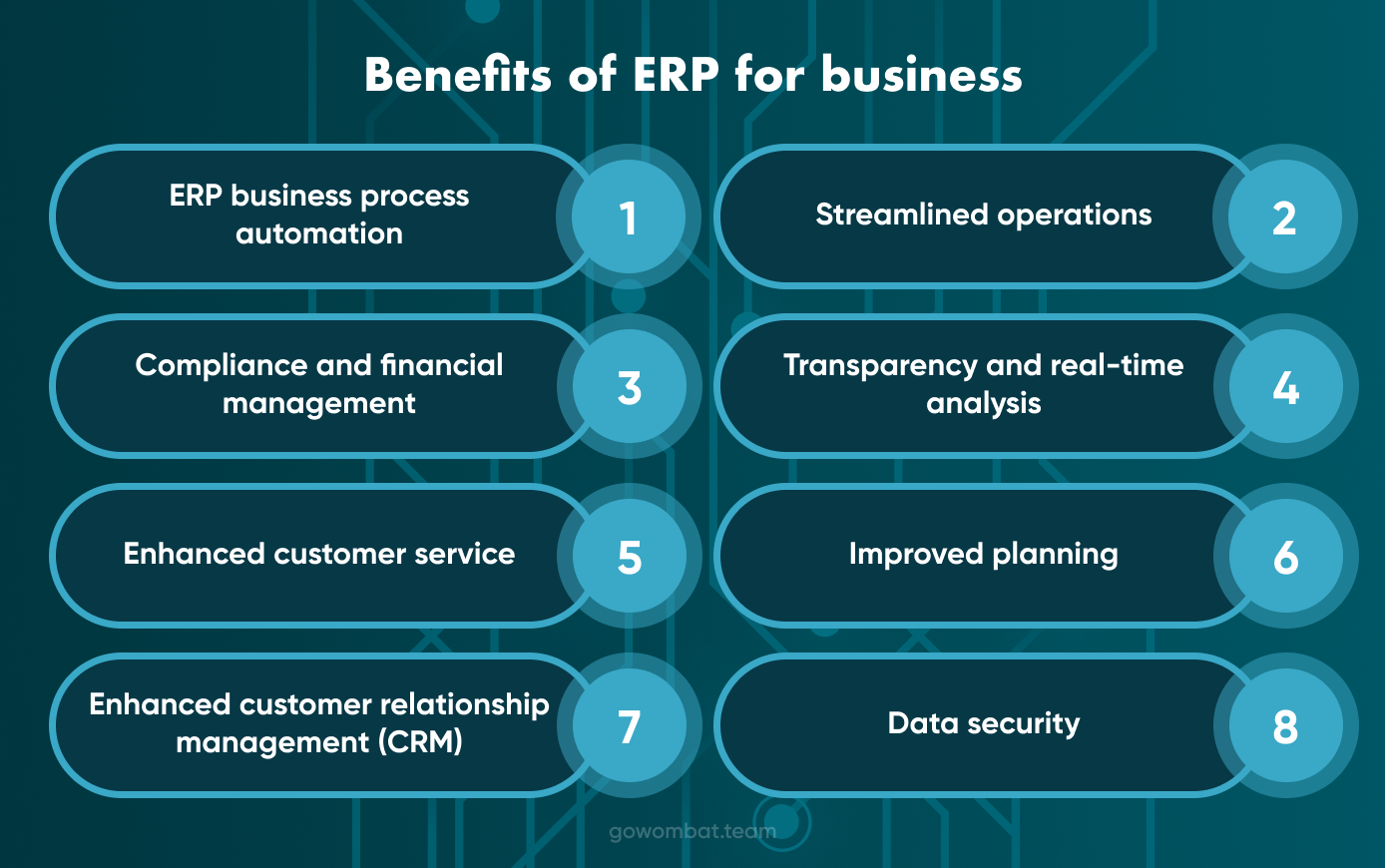
Operational Efficiency and Process Automation
Here's what order processing looks like in a lot of mid-size companies. Sales logs the order. Warehouse gets an email. Finance finds out eventually. If someone's on leave or the email gets missed, the whole thing stalls and whoever's responsible for the account starts chasing.
It's not dramatic. Just slow, and it happens dozens of times a day.
ERP removes the chain by connecting the systems. Order comes in, inventory adjusts, the warehouse pick list generates, payment gets scheduled, customer gets a notification. Nobody acts as a relay. Not automation in some grand sense, yet just integration between tools that were previously doing their own thing in isolation.
A manufacturer juggling separate platforms for production, inventory, and accounting often spends fifteen to twenty hours a week just reconciling data before any analysis even begins. Panorama Consulting's 2026 ERP Report found that the vast majority of companies that implemented ERP reported process improvements in year one. Operational efficiency came up more consistently than anything else, across sectors and company sizes.
That time doesn't disappear. It moves somewhere more useful.
Real-Time Data and Smarter Decision-Making
The data problem in most mid-size businesses isn't volume. It's timing. Reports land a day late, or they're built from three different exports that don't quite match, or someone's working off a version of the spreadsheet that got emailed around last Thursday.
ERP doesn't generate new data. It makes the data that already exists visible in real time, across the business, without anyone needing to pull a report or chase a number down.
What that looks like on the ground: a sales rep checks live stock mid-call and commits to a delivery date they can actually stand behind. A finance director pulls up the cash position on a Tuesday afternoon rather than waiting for the month-end. An operations manager sees a production line slipping behind schedule while there's still time to do something about it.
Decisions don't get smarter on their own. But they get made faster, on better information, with less chance of being blindsided by something that happened two days ago.
Connecting ERP to business intelligence tools pushes this furtherб from knowing what's happening now into understanding what's likely to happen next, which is a genuinely different kind of planning.
Financial Control and Compliance
Finance teams in mid-size businesses often work harder than the complexity of the work warrants. The issue isn't the accounting itself. It's because the tools aren't connected. One platform handles accounting, a separate one manages expenses, and another runs payroll. Month-end close becomes a multi-day consolidation exercise rather than a review of numbers that are already assembled.
ERP puts all of it in one place. Revenue recognition, tax calculations, multi-currency transactions, intercompany accounting, and audit trails. The compliance requirements for each jurisdiction are built into the workflow rather than applied retrospectively by someone who has to remember to do it.
A professional services firm operating across several European countries faces local tax rules, different reporting standards, and group consolidation requirements simultaneously. Managing that without ERP typically means a combination of local accountants, manual exports, and a lot of email. With ERP, the same processes run inside a single system, and the consolidated view is available without anyone assembling it by hand.
For regulated industries, this stops being a cost conversation. It's a risk management one.
Improved Customer Service and CRM Integration
A lot of customer service problems get attributed to the wrong thing. It's a rare attitude. Usually, it's that the person trying to help doesn't have the information in front of them.
Client calls about an order. Rep checks one system, doesn't find it, checks another, sends an internal email, comes back to the client with a half-answer. Client hangs up, mildly frustrated. Nothing malicious happened. The information just wasn't where it needed to be.
ERP with CRM integration puts order history, delivery status, invoices, previous complaints, and payment terms all in one screen. The rep answers straight away. And beyond individual calls, patterns start to surface: an account that's been quieter than usual, a client whose last three deliveries were late. The data was always there. ERP makes it readable before it becomes a conversation you'd rather not be having.
For businesses with complex order cycles (construction, field services, manufacturing), this isn't really a service quality story. It's about keeping accounts that took a long time to win.
Data Security and Centralised Control
Each software tool a business adds comes with its own security considerations. Its own access policies, its own backup setup, its own patching schedule. Five tools mean five separate things to get right, and in practice, some of them get more attention than others.
ERP consolidates all of that under one framework. Access is role-based: people see what relates to their function and not much beyond it. Every change gets logged. Recovery processes are consistent rather than being handled differently by each department based on whoever set things up originally.
For healthcare providers, finance firms, and legal practices, this is simply what regulators expect. For businesses outside those sectors, the argument for consolidation is getting harder to ignore as the threat environment targeting mid-size companies has shifted considerably in recent years.
Cloud ERP vs On-Premise: Which Model Fits Your Business?
The standard framing is that the cloud is cheaper, and on-premises is more secure. This isn't wrong exactly, but it leaves out enough that it's not much help when you're actually making the decision.
Cloud runs on the vendor's infrastructure. You pay a subscription, and they handle maintenance, updates, and backups. SAP S/4HANA Cloud, Microsoft Dynamics 365, NetSuite - all of them have developed to the point where the feature difference between cloud and on-premise is pretty marginal for most standard business use cases. For a company that doesn't have a large internal IT function and wants to get moving without a major capital outlay, the cloud is the obvious starting point.
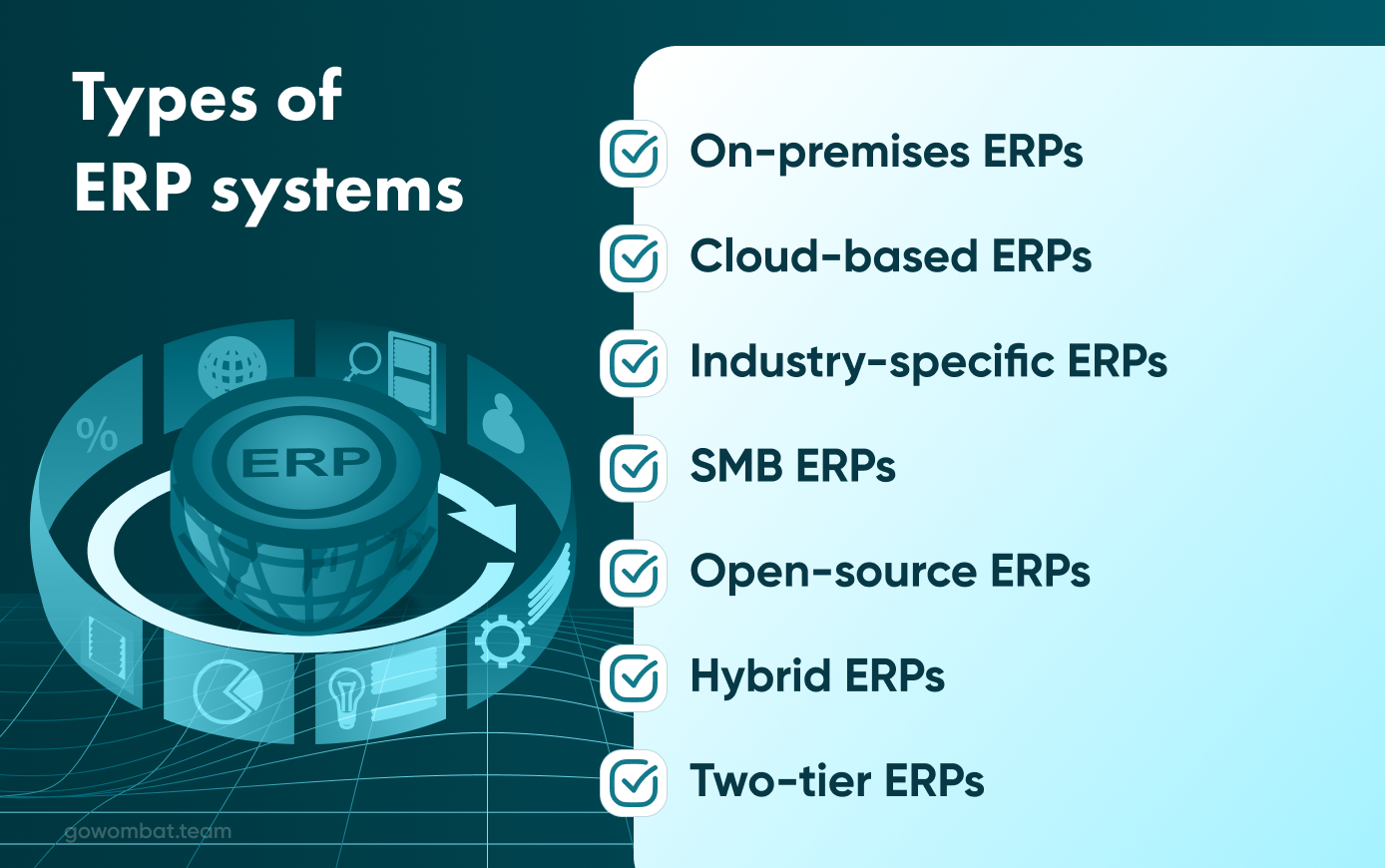
On-premise is a different calculation. Higher upfront cost, internal maintenance responsibility, but you own the data environment entirely. Customisation goes deeper to the code level, not just configuration. Companies in heavily regulated sectors, or those with workflows that genuinely don't fit what a SaaS platform can accommodate, often find that on-premise makes more sense over a longer horizon, even with the higher entry cost.
Hybrid has become more common in 2026 because it reflects how a lot of businesses actually operate. Sensitive data and critical processes stay on-premises. HR, CRM, and field operations move to the cloud. The architecture takes more managing, but it's not a compromise so much as a practical split.
Which is right for a given business comes down to what the IT team can realistically handle, how unusual the company's workflows actually are, and what compliance genuinely requires rather than what it's assumed to require.
How ERP Improves Business Operations Across Industries
The operational logic is consistent. How it plays out differs considerably by sector.
Manufacturing
An automotive parts manufacturer (280 employees, three production lines, two warehouse sites) was scheduling production off a system that pulled inventory data through a nightly export. By morning, the numbers were already twelve hours old. When actual stock didn't match the plan, lines stopped while someone physically counted and updated the spreadsheet. It happened regularly enough to be a known problem with no clean fix.
After ERP went live, production planning pulled from live inventory. When stock dropped below set thresholds, procurement requests were generated automatically. Emergency orders in the first six months dropped 23%. Line stoppages from inventory mismatches dropped further.
The factory floor didn't change. What changed was how reliably the information that runs it actually reflected reality. More on ERP for manufacturing businesses and what implementation involves at scale.
Oil and Gas
The cost of things going wrong in asset-heavy industries tends to be disproportionate to what it would have cost to prevent them. That's the core problem ERP solves in oil and gas.
A field services company across six sites needs equipment status, maintenance records, compliance documentation, and project costs all visible at once, across all locations. Without a connected system, the information exists, and it's just scattered. Maintenance gaps happen not because nobody cared, but because the picture was never complete enough to act on.
Custom ERP built for this environment changes that. Maintenance runs off actual usage data rather than fixed schedules. Compliance reports are generated from operational records rather than being assembled manually the week before an audit. The specifics of ERP in oil and gas are far enough from generic enterprise software that the customisation required is significant. Off-the-shelf platforms generally weren't built with this operational reality in mind.
Healthcare
A private healthcare group running seven clinics faces coordination problems that compound with every additional site. Patient records are held separately per clinic. Supplies are ordered and managed locally. Finance is consolidated manually at the group level, often weeks after the fact.
ERP integration creates a connected view across the whole group. Patient data is accessible where it's needed with appropriate access controls in place. Supply replenishment runs off usage patterns. Financial reporting consolidates in real time. The compliance requirements around healthcare data, access controls, storage, and audit trails are embedded in the system rather than being a separate process someone has to remember to follow.
Wholesale Distribution
A distributor with over two hundred supplier relationships and fifteen hundred client accounts had hit the ceiling on what manual logistics could manage. Fulfilment ran on a warehouse system with no connection to sales. If a customer service rep wanted to check an order status, they called the warehouse. That was the process.
Post-ERP, orders, fulfilment, returns, and supplier payments ran inside a single system. Response times improved not because anything was automated in a complex sense, but because the information was simply available where it was needed. Stock discrepancies that previously only turned up at physical stock-take showed up in real time and got resolved before they affected a shipment.
Headcount stayed the same. Capacity increased.
ERP Implementation: What to Expect
Most ERP projects that go badly don't fail because of the software. They fail because the organisation wasn't ready: requirements were vague going in, the data was in worse condition than anyone admitted at the start, and change management was treated as something to address after go-live rather than before it.
For a mid-size business, here's what a realistic timeline looks like.
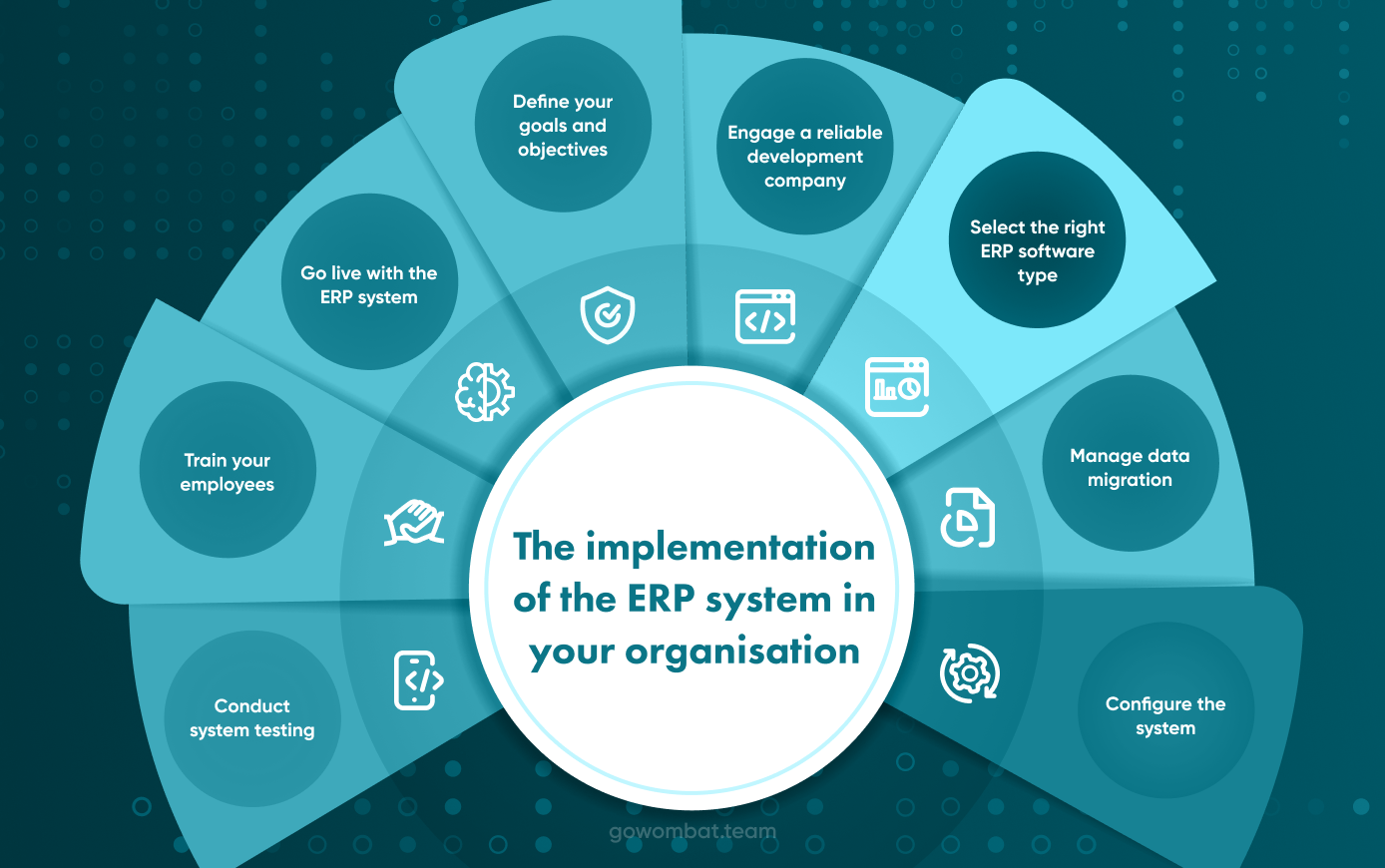
Discovery and scoping, four to six weeks. This is where requirements get documented, processes get mapped, and software gets selected. It's also where the success criteria need to be defined, because ambiguous goals produce ambiguous outcomes. Businesses that rush this pay for it across every phase that follows.
Data migration takes three to eight weeks, and almost always longer than the initial estimate. Getting legacy data clean, structured, and validated before it moves into a new system is genuinely slow work. One week spent on this before migration saves two or three weeks of post-launch firefighting. That ratio holds pretty consistently.
Configuration and development, six to sixteen weeks depending on customisation depth and the number of modules involved.
User acceptance testing takes three to four weeks. Real workflows, not demo scenarios. Every department that will use the system needs to be in the room.
Training, two to four weeks, role-specific. Generic platform walkthroughs produce low adoption. People need to learn how their own job works in the new system.
Go-live and stabilisation, four to eight weeks post-launch, before operations reach full confidence. Things will need adjustment. A successful go-live isn't one where nothing breaks, and it's one where issues get fixed without the business losing continuity.
Five to nine months total for a mid-size rollout. Enterprise goes longer.
Working with a team that understands your operational context rather than just the platform makes a real difference to how that timeline plays out. Go Wombat's custom ERP development is built around what the business actually needs, not what a standard configuration can approximate. Just send us a brief!
Conclusions
ERP doesn't fix strategic problems. A business without clear processes won't get clarity from software. It'll get faster chaos. That's worth saying directly because the pitch for ERP doesn't always make it clear.
What ERP does is structural. It removes the drag that builds up as a business grows: coordination overhead between departments, manual reconciliation between disconnected systems, and decisions made on data that was already out of date when it arrived. None of these is a dramatic problem individually. Together, over the years, they consume a disproportionate share of organisational energy that should be going elsewhere.
The benefits compound in the other direction once the ERP solution is in place. Real-time visibility in year one becomes the foundation for more sophisticated planning in year two. Automation that frees up capacity in one department creates resources that get applied somewhere more valuable. The data quality that ERP enforces makes every downstream investment in analytics or AI more effective because the inputs are consistent and current.
In 2026, operationally stronger businesses are not always the ones with the largest technology budgets. They're usually the ones who made an earlier decision to connect their operations into a coherent system and then built on that foundation rather than continuing to work around fragmentation.
If your current tools have stopped scaling with your business, Go Wombat builds custom ERP solutions designed around how your operations actually work.
FAQ
What are the main ERP system benefits for business?
ERP brings finance, HR, supply chain, sales, and customer service into one connected platform. The practical gains are process automation, real-time operational visibility, stronger financial control, compliance built into daily workflows, and better customer service because teams have complete account information. For mid-size businesses, the most immediate shift is usually the reduction in manual reconciliation work and the speed at which operational decisions get made and acted on.
How does ERP improve business operations day to day?
It mostly removes coordination overhead. When a sales order comes in, inventory, production, and finance update automatically without anyone relaying information between systems. Managers work from live data. Customer service teams answer questions immediately rather than making calls to find out. The work itself doesn't disappear, but the friction between work happening and people knowing about it largely does.
Cloud ERP or on-premise: which suits a mid-size company better?
Cloud is the more practical starting point for most mid-size businesses in 2026. Lower upfront cost, faster deployment, vendor-managed maintenance. On-premise fits businesses with deep customisation needs, strict data sovereignty requirements, or compliance environments that hosted infrastructure can't meet. Hybrid works for organisations that genuinely need elements of both. There's no universal answer. It depends on IT capacity, regulatory context, and what your processes actually need.
How long does ERP implementation take?
Five to nine months for a mid-size business from scoping to stable operations. The phase that project plans consistently underestimate is data migration, specifically the work of cleaning and structuring legacy data before it moves to the new system. Rushing that phase is the most common cause of post-launch problems and the hardest to recover from once you're live.
What industries benefit most from ERP?
Manufacturing, wholesale distribution, healthcare, professional services, construction, and oil and gas see consistently strong returns. What these sectors share is operational complexity: multiple departments coordinating, significant cost exposure when errors occur, and high volumes of transactional data needing accurate tracking. The more moving parts a business has, the more ERP has to offer.
Is custom ERP better than off-the-shelf software?
Off-the-shelf platforms work well for businesses with standard workflows and IT teams capable of managing ongoing configuration. Custom ERP becomes the stronger long-term choice when processes are highly industry-specific, when deep integrations are required that standard platforms don't support cleanly, or when the level of configuration an off-the-shelf product needs starts approaching the cost of building something purpose-built. Over a five to seven-year horizon, total cost of ownership frequently favours custom development for operationally complex businesses.
Share and subscribe to our blog
Related articles

How Business Intelligence in ERP Can Improve Your Company
Businesses today are constantly seeking innovative approaches to gain a competitive edge. In this landscape, integrating business intelligence (BI) with enterprise resource planning (ERP) systems makes for a transformative alliance. This a…

How to create an ERP System
As a company develops and grows, so too do the departments and personnel. Inter department communication increases, which, in turn, increases the complexity of an organisation requiring a greater level of insight. ERP software development…

The Essentials of Custom ERP for the Oil and Gas Industry
The oil and gas industry is one of the world's most complex and dynamic sectors. It involves the exploration for, extraction, production, and transportation of oil and gas, as well as the processing and refining of these resources into a r…

How can we help you ?